
Your yabby.page subdomain
Every website gets a free address at <slug>.yabby.page — here's how to choose and change it.
Your free address
Every yabby website lives at https://<slug>.yabby.page. The slug is yours to choose, and it's the URL your site is reachable at as soon as you publish — no domain purchase or DNS setup needed.
Choosing a good slug
Your slug is part of the URL people see and share, so pick one that's easy to say out loud and type:
- Use your channel name or a close variation, so viewers recognize it instantly.
- Keep it short and lowercase, without numbers or filler words if you can avoid them.
- Pick something you won't want to change later — the slug is baked into every link you share.
Change your slug
Open your website in the editor and switch to the Settings tab.
In the Subdomain card, enter your new slug.
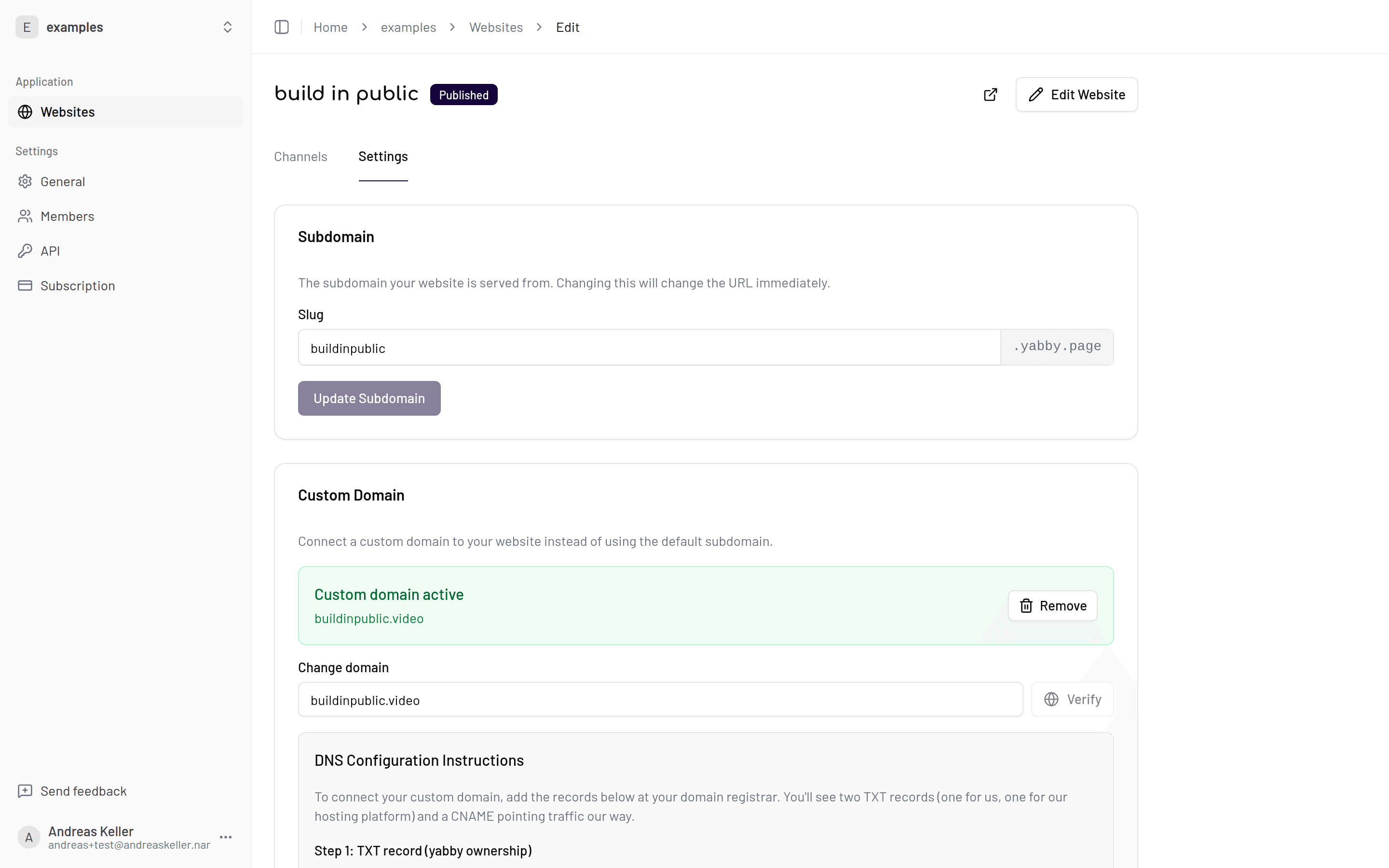
Save. The change takes effect immediately — your site is now at the new URL.
The old URL stops working
Slug changes are immediate and the old subdomain stops resolving right away. Links in your video descriptions, social bios, and anywhere else will break until you update them. Change your slug early — or not at all once your site is out in the world.
With a custom domain
If you connect a custom domain, your yabby.page subdomain remains as a fallback — your site stays reachable at <slug>.yabby.page while you set up the custom domain, so there's no downtime while DNS records propagate.